Skip to main content
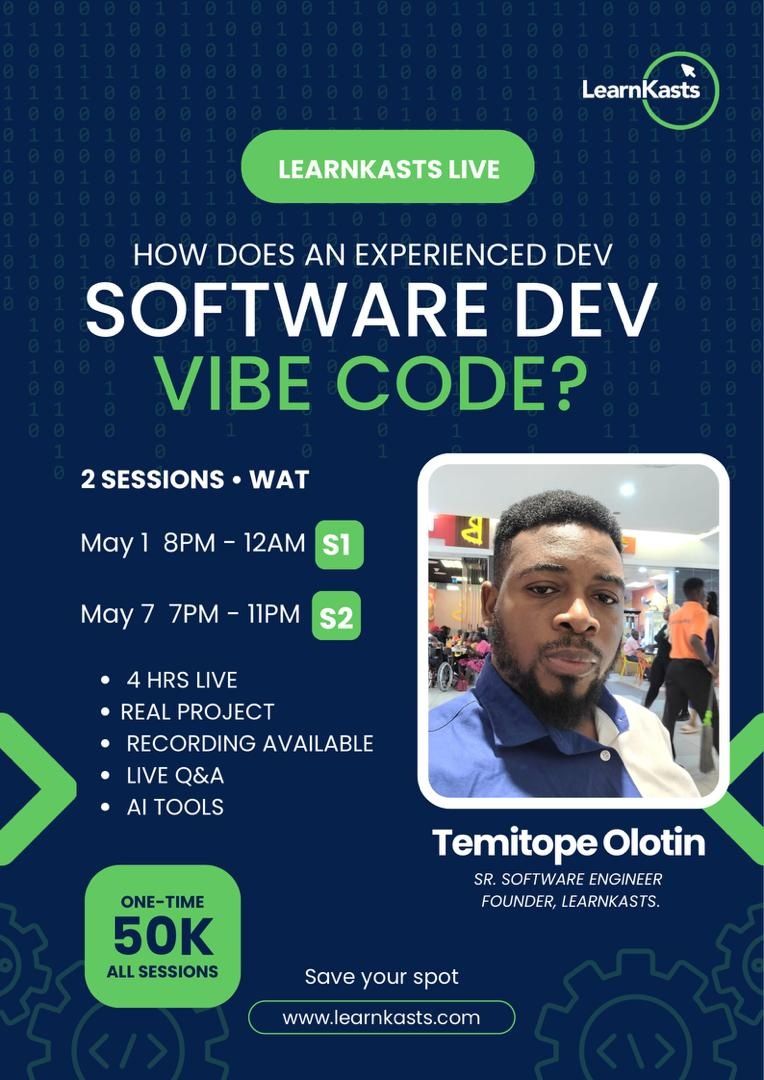
AI tools like Claude Code and Codex have made it faster than ever to get something up and running. But there's a common obstacle: when the app breaks in production, the AI provides five incorrect fixes in a row, or the codebase becomes impossible to understand. That obstacle isn't the AI's fault. It's the missing engineering fundamentals underneath.
This session closes that gap. You'll learn to use AI as a force multiplier, not a crutch, so when the AI is wrong (and it will be), you know
What we're building
Hour 1 - Architecture before code
- How to think about a feature before you prompt for it
- Breaking requirements into components that an AI can actually build correctly
- Folder structure, routing, and database design in Laravel: why it matters before you type a single line
Hour 2 - Building with AI, not for AI
- Live prompting with Claude Code and Codex
- Reading AI-generated code critically, what to trust, what to question
- Blade templates and Tailwind layouts built side by side with the AI
- When to accept the suggestion, when to rewrite it, and how to tell the difference
Hour 3 - Debugging, testing, and monitoring
- End-to-end testing with real assertions, not just "it looks right."
- App monitoring basics: what to watch, what to alert on
- Prompt fine-tuning: how to improve your results by improving your inputs
- Debugging strategies when the AI's fix makes things worse
Hour 4 - Systems thinking in a vibe coding world
- How professional engineers reason about performance, security, and maintainability
- What AI tools still can't do, and why that's your competitive edge
- Shipping the app: deployment, environment config, final review
- Live Q&A
Who this is for
- Developers who've used AI to build things but want to understand why they work
- Beginners who want to start with the right mental model, not just copy-paste prompts
- Anyone who's hit the wall where AI stops being helpful and wants to break through it
What you leave with
- A working Laravel + Tailwind web app you built in the session
- A repeatable workflow for AI-assisted development that doesn't fall apart under pressure
- The debugging and systems thinking skills that separate engineers who use AI well from those who depend on it
Format: 4 hours live, hands-on, build-along
Tools: Claude Code, Codex, Laravel, Tailwind CSS, HTML5, Blade
Web Development Using AI Coding Assistant
AI Makes Coding Easier. Lack of Fundamentals Still Breaks Projects.
- 1 learner
- 1 lesson
- Beginner
Created by LearnKasts Demo
₦50,000
There are no open cohorts right now. Join the waitlist and we’ll notify you when the next one opens.
What's included
- 1 lesson
- 1 module
- Access on any device
- Lifetime access
Secure checkout via Paystack
Curriculum
1 module · 1 lesson
-
Real-World Web Development Using AI Tools
Description
Vibe Coding with Claude Code & Codex - Build Real Apps, Think Like an Engineer
The truth about vibe coding
AI tools like Claude Code and Codex have made it faster than ever to get something up and running. But there's a common obstacle: when the app breaks in production, the AI provides five incorrect fixes in a row, or the codebase becomes impossible to understand. That obstacle isn't the AI's fault. It's the missing engineering fundamentals underneath.
This session closes that gap. You'll learn to use AI as a force multiplier, not a crutch, so when the AI is wrong (and it will be), you know
Exactly why and what to do about it.
What we're building
A functional web application from scratch, live, in real time, using:
- HTML5 + Tailwind CSS for the frontend
- Laravel + Blade for the backend and templating
- Claude Code / Codex as our AI pair programmer throughout
Every decision gets explained. Every AI suggestion gets evaluated. You'll see the full cycle: prompt → review → accept, reject, or fix.
- HTML5 + Tailwind CSS for the frontend
- Laravel + Blade for the backend and templating
- Claude Code / Codex as our AI pair programmer throughout
Every decision gets explained. Every AI suggestion gets evaluated. You'll see the full cycle: prompt → review → accept, reject, or fix.
What do the 4 hours cover
Hour 1 - Architecture before code
- How to think about a feature before you prompt for it
- Breaking requirements into components that an AI can actually build correctly
- Folder structure, routing, and database design in Laravel: why it matters before you type a single line
Hour 2 - Building with AI, not for AI
- Live prompting with Claude Code and Codex
- Reading AI-generated code critically, what to trust, what to question
- Blade templates and Tailwind layouts built side by side with the AI
- When to accept the suggestion, when to rewrite it, and how to tell the difference
Hour 3 - Debugging, testing, and monitoring
- End-to-end testing with real assertions, not just "it looks right."
- App monitoring basics: what to watch, what to alert on
- Prompt fine-tuning: how to improve your results by improving your inputs
- Debugging strategies when the AI's fix makes things worse
Hour 4 - Systems thinking in a vibe coding world
- How professional engineers reason about performance, security, and maintainability
- What AI tools still can't do, and why that's your competitive edge
- Shipping the app: deployment, environment config, final review
- Live Q&A
Who this is for
- Developers who've used AI to build things but want to understand why they work
- Beginners who want to start with the right mental model, not just copy-paste prompts
- Anyone who's hit the wall where AI stops being helpful and wants to break through it
What you leave with
- A working Laravel + Tailwind web app you built in the session
- A repeatable workflow for AI-assisted development that doesn't fall apart under pressure
- The debugging and systems thinking skills that separate engineers who use AI well from those who depend on it
Format: 4 hours live, hands-on, build-along
Tools: Claude Code, Codex, Laravel, Tailwind CSS, HTML5, Blade
Your instructor
LearnKasts Demo
BrowseRecommended courses
More courses you might find useful

Checkout
Web Development Using AI Coding Assistant
Order summary
Web Development Using AI Coding Assistant
Total
₦50,000
Secure payment powered by Paystack